Automatic data retention
By default, Real ID keeps ID check data until you delete it. If you'd rather have customer data deleted automatically once you no longer need it, set a data retention period. Each night, Real ID deletes the photos and personal details from ID checks older than that period.
Data retention is currently available on Shopify, on the Essential plan and above.
Turn on automatic deletion
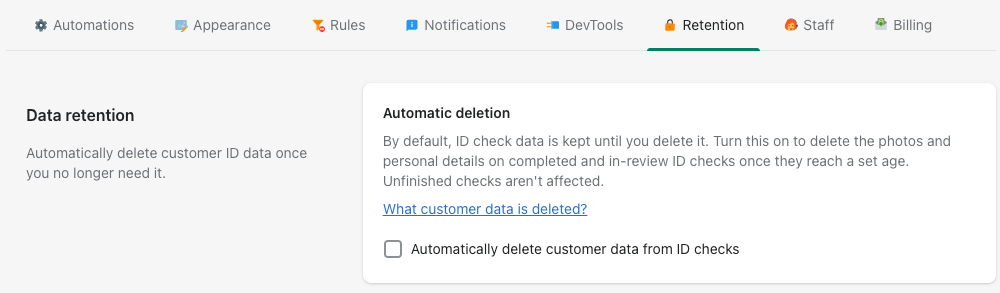
- In Real ID, go to Settings and open the Retention tab.
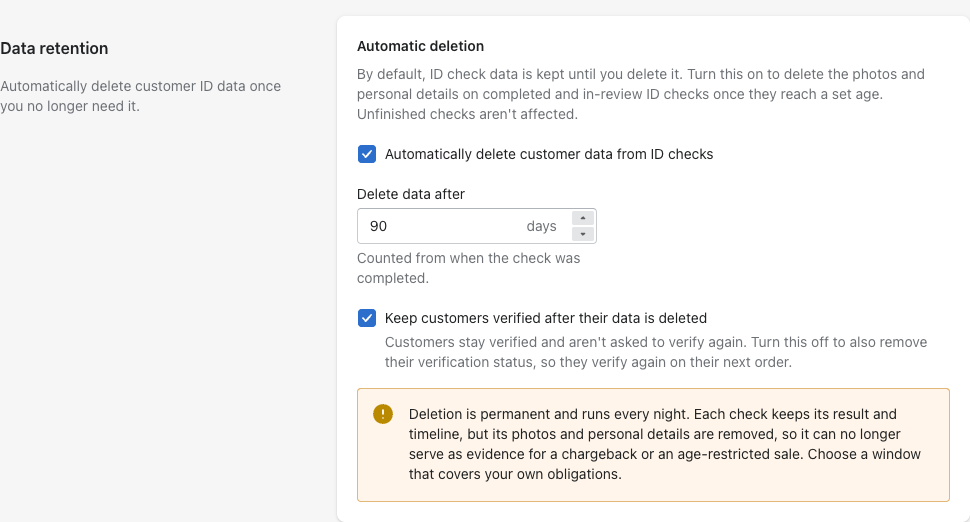
- Select Automatically delete customer data from ID checks.
- In Delete data after, enter how many days to keep ID check data, from 1 day up to 5 years (1,825 days). The period is counted from when the check was completed.
- Choose whether customers stay verified. Keep customers verified after their data is deleted is on by default. Turn it off if customers should verify again once their data is gone. See Keeping customers verified.
- Select Save.
To stop deleting data, clear Automatically delete customer data from ID checks and save. Data that was already deleted stays deleted.
What gets deleted
Every night at 06:00 UTC, Real ID checks your store for ID checks older than your retention period. It deletes data only from checks that are completed or in review. Checks your customers didn't finish aren't affected.
From each of those checks, Real ID permanently deletes:
- ID photos, selfies, signatures and any other uploaded or signed documents
- the customer's name, email address and phone number
- the details read from the ID, such as date of birth, address and document number
- the order and address details used to cross-check the ID
- the customer's device and browser details
The check itself stays in Real ID with its result and timeline, so you can still see that the customer was verified.
Deleted data can't be restored. Once a check's photos and personal details are gone, it can no longer serve as evidence that an age-restricted sale was verified or that a chargeback was unjustified. Choose a retention period that covers your own legal and business obligations.
Keeping customers verified
Deleting a customer's data doesn't have to mean asking them to verify again. You choose:
- Keep customers verified after their data is deleted (default): customers who passed stay verified. On Shopify, their customer profile keeps its Real ID verification tag, so they aren't asked to verify again when they check out with their account. Guest customers, who are only recognized by their email address, may be asked to verify again, since the email address is deleted with the rest of their data.
- Turned off: Real ID also removes the customer's verification status. It removes Real ID's verification tags and the
real_idverification metafields from the Shopify customer, and unlinks the check from the customer. They're asked to verify again on their next order. If the customer passed a more recent check that isn't being deleted, they stay verified through that check.
Turn it off when you need a fresh ID check after your retention period, for example when the law requires you to re-verify customers periodically.
How you're notified
Each check whose data was deleted gets an entry on its timeline with the date and your retention period, for example "Customer ID verification data was permanently deleted under the store's 365-day data retention policy." You can use it as a record that your policy was applied.

After a night when data was deleted, your store's contact email gets a summary with the number of checks and links to them. If you don't keep customers verified, the summary also says how many customers will be asked to verify again, and each check's timeline entry says so too.
When anyone turns automatic deletion on or off, or changes the retention period or the verification option, every staff member gets an email. It says who made the change, the new policy, when the next deletion runs (every night at 06:00 UTC) and how many checks it will delete. If the change was a mistake, correct it in Settings > Retention before then: deleted data can't be restored.
Frequently asked questions
Will customers need to verify again?
Not by default. On Shopify, Real ID marks verified customers on their profile, and that stays in place after their data is deleted, so customers who check out with their account are still recognized. Guest customers may be asked to verify again. If you turn off Keep customers verified after their data is deleted, every customer whose data is deleted is asked to verify again. See Keeping customers verified.
Can I still delete a customer's data myself?
Yes. You can delete a customer's data from any ID check at any time, whether or not data retention is on.
How does this relate to the GDPR?
The GDPR expects you to keep personal data no longer than you need it. A retention period helps you meet that without deleting data by hand. See GDPR compliance for more.