Create ID checks in bulk in Shopify
Real ID can be configured to automatically verify IDs before, during or after checkout. However, you may need to back fill older orders where customers haven't verified their IDs yet.
In this case, you can send ID verification links in bulk to your customers from the orders page in your Shopify dashboard.
This method allows you to send up to 50 ID checks at a time.
Please note, by default Real ID is only granted access to read the last 60 days of order history on your Shopify store.
If you select one or more orders that are older than 60 days, Real ID won't be able to read the required details like the customers name, email address and more.
If you need to send ID checks to orders that are older than 60 days, please contact us for help.
Getting started
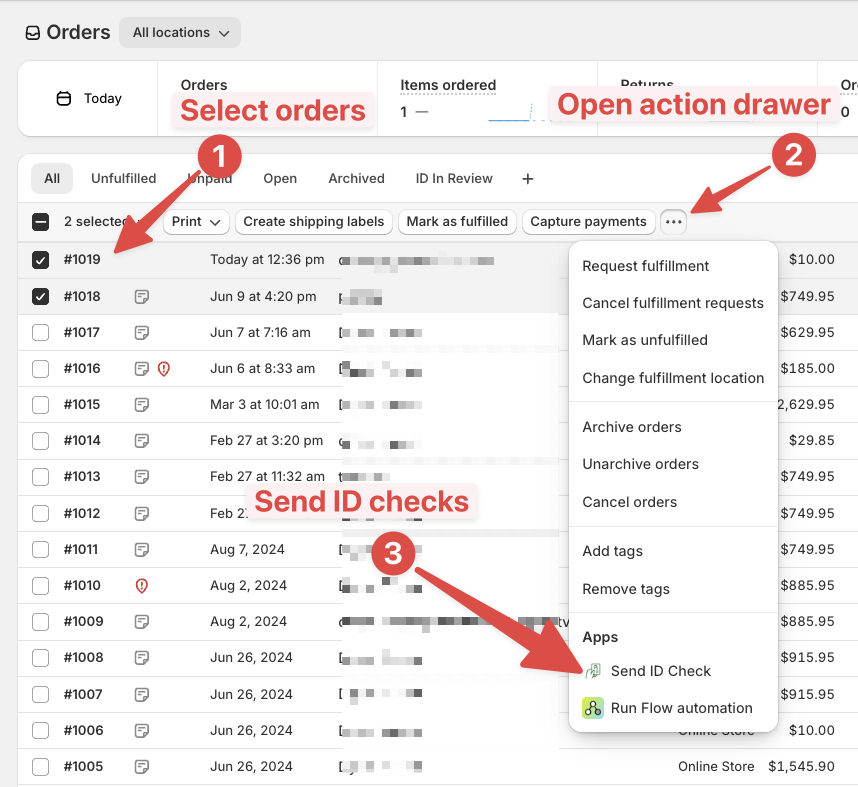
First, open your Shopify dashboard and open the Orders page. Here you can select one or more orders using the checkboxes on the left hand side.
Once you have selected the orders you would like to send ID checks for, open the three dot menu (...) on the top of the orders and select Send ID check.
You can also select all orders on the current page by checking the box in the top portion of the menu.
This is also compatible with Shopify Order Views to help pre-filter orders based on the customer's ID verification status.
Then you'll see a pop-up that confirms you'd like to send these ID checks. Finally, click Send to send these customers ID verification links.
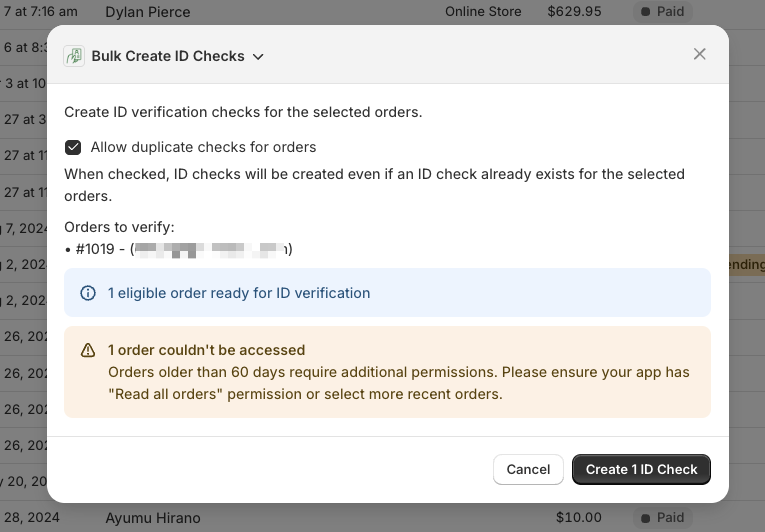
By default, Real ID will send a new ID verification link to any order that already has one. If you don't wish to send a new ID verification link, uncheck the allow duplicate checks for orders checkbox.
Frequently Asked Questions
Will this use my custom settings I set up in the app?
Yes, these ID verification emails and links will use your pre-exisiting settings such as your content, theme, using your own email address to send these ID verification links.
This will include the rules such as live selfie capture, cross checking order details, and custom confidence thresholds.
Will these ID verification emails be sent instantly?
As instantly as possible yes, all of these ID verfication emails will be delivered, and the ID verification results will appear in your Real ID app dashboard.
Will this trigger the Real ID Shopify Flow Trigger ID verification required for an order?
Yes, every one of these ID verification links will also trigger any Shopify Flow workflows that have the ID verification required for an order as the trigger for that workflow.
Will this send a new ID verification link if one is already created for the order?
By default yes, but unchecking the box to
Will already verified customers be sent an ID verification link?
Yes, already verified customers will still be sent an ID verification link if they weren't already sent one for that specific order, regardless if they have verified in the past.
Customer [email protected] ordered a few months ago, and they verified their ID on your Shopify store with their order #1001.
This customer returns and places another order #1002, they aren't required to verify their ID again because they are remembered.
However, if the #1002 order is selected and sent an ID check manually it will be delivered, since an ID check doesn't exist for this specific order.
We highly recommend setting up a orders view in Shopify. That way you can filter out already verified customers if you would prefer not to send ID verification links to already verified customers.